
Cucumber Java Tutorial
In the fast-changing world of software creation, maintaining the top-notch quality of software products is essential. Behavior-Driven Development (BDD) emphasizes a collaborative approach among coders, quality assurance teams, and key participants to confirm that the software is in line with expected functionality and behavior.
Cucumber, a well-regarded open-source resource, lays the groundwork for adopting BDD. It permits team members to outline test situations in an easily understood language that can subsequently be transformed into automated tests. This handbook offers insights on how to effectively utilize Cucumber in conjunction with Java to enhance testing strategies and uplift the quality of your software.
Diving into BDD and Cucumber
Behavior-Driven Development (BDD) zeroes in on the software’s behavior as perceived by the end user. It champions a collaborative effort among coders, testers, and key stakeholders to outline and validate the projected behavior of software.
Cucumber, acting as a BDD tool, facilitates the crafting of test situations in an easily digestible language known as Gherkin. This language is intelligible for both tech-savvy and non-tech individuals. These defined scenarios are then converted into automated tests, ensuring transparency in communication and uplifting software’s overall quality.
Setting Up the Environment
Setting up the development environment is a foundational step in implementing Behavior-Driven Development (BDD) with Cucumber and Java. Proper environment setup ensures the presence of all necessary tools and dependencies for creating, executing, and managing BDD tests. In this section, we will guide you through the key steps of setting up the environment for Cucumber and Java development.
- Install the Java Development Kit (JDK). Java is the programming language used for writing step definitions and other testing-related code. Ensure that your system has the appropriate version of the Java Development Kit (JDK) installed. You can download the JDK from the official Oracle website or opt for the OpenJDK distribution that suits your preferences;
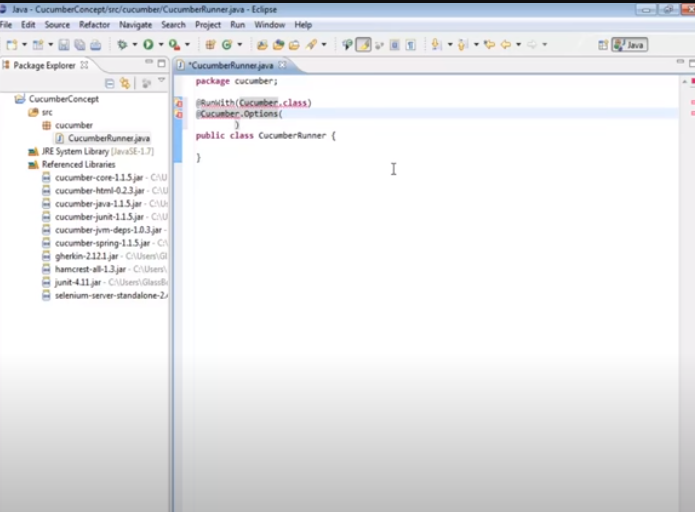
- Choose an Integrated Development Environment (IDE). An Integrated Development Environment (IDE) is a comprehensive platform for writing, testing, and debugging code. Popular options include Eclipse, IntelliJ IDEA, and NetBeans. Select an IDE that you find comfortable to work with and that supports Java development;
- Configure the IDE. Once you’ve chosen an IDE, install any necessary plugins and extensions for Java development and integration with Cucumber. These plugins often offer features like syntax highlighting, code completion, and test execution tailored for Cucumber;
- Create a New Project: Within your chosen IDE, create a new Java project to house your Cucumber BDD tests. Give the project a meaningful name and choose an appropriate location on your local machine;
- Add Dependencies. To ensure Cucumber and Java integration, you need to add necessary dependencies to your project. Typically, this involves including the Cucumber-Java and Cucumber-JUnit dependencies in your project’s build configuration file (e.g., pom.xml if you’re using Maven). These dependencies provide the tools and libraries required for creating and executing Cucumber tests.
Let’s provide an example of adding Cucumber dependencies to the pom.xml file for Maven:
xml
Copy code
<dependencies>

    <!-- Other dependencies -->

    <dependency>

        <groupId>io.cucumber</groupId>

        <artifactId>cucumber-java</artifactId>

        <version>6.11.0</version> <!-- Use the latest version -->

        <scope>test</scope>

    </dependency>

    <dependency>

        <groupId>io.cucumber</groupId>

        <artifactId>cucumber-junit</artifactId>

        <version>6.11.0</version> <!-- Use the same version as cucumber-java -->

        <scope>test</scope>

    </dependency>

</dependencies>- Begin with your inaugural Feature file. In your project, allocate a folder specifically for feature files. These files, penned in Gherkin, outline your software’s behavior using different scenarios and steps. Each file delves into a unique feature of the software. To kick things off, draft an uncomplicated feature file with select scenarios;
- Construct step definitions. Set up a Java collection in your project meant for step definition files. These files carry the code that deciphers Gherkin stages and implements related activities. Craft step definition strategies for the scenarios sketched out in the feature file;
- Initiate your maiden Cucumber evaluation. Use your IDE’s synchronization with Cucumber to instigate your feature file as a Cucumber assessment. This initiates the execution of linked step definitions and generates a report on test outcomes, allowing you to see the status of each step;
- Problem-solving and Diagnosis. In your journey with Cucumber and Java, stumbling blocks or unanticipated behaviors might arise. For identifying hiccups in your coding, employ the debugging tools in your IDE. Review console feedback, error alerts, and system traces to identify problem origins.
Remember, establishing the setting is merely the commencement of your voyage with Cucumber and Java. To enrich your knowledge, dive into digital lessons, guides, and community chat rooms focused on Cucumber, Java, and BDD methodologies. Such platforms provide priceless knowledge, adept strategies, and answers to routine obstacles.
Decoding Gherkin Scriptwriting
Gherkin serves as the scripting language for penning Cucumber narratives. It’s a clear-cut, organized language that chronicles software behavior in a manner graspable to both tech experts and laypersons. Narratives are split into steps that adhere to a distinct format with components like Given, When, and Then. The Given step establishes context, When details the action, and Then portrays the expected result. This organized approach streamlines the development of precise and exhaustive testing narratives.
Crafting Step Definitions
Step definitions are Java-driven strategies that metamorphose Gherkin stages into actionable tasks. Every scenario step resonates with a corresponding step definition method where the evaluation logic is fleshed out.
Within these strategies, interaction with the software takes place, activities are performed, and assertions are set to validate anticipated behaviors. Merging Cucumber with JUnit ensures smooth operation control and result-oriented reporting.
Running the Cucumber Tests
Once your Gherkin scenarios and corresponding step definitions are ready, you can run tests using Cucumber. The Cucumber mechanism scans your project for Gherkin scenarios, matches them with appropriate step definitions, and executes the tests.
Test results are displayed in a readable format, indicating which scenarios passed and which ones failed. This visual representation helps identify problematic areas and guides efforts to improve software behavior.
Data-driven Testing with Examples
Cucumber enables data-driven testing using the Examples keyword in scenarios. This allows you to run the same scenario with multiple sets of data, ensuring comprehensive test coverage.
Data is provided in a tabular format, and Cucumber automatically generates test runs for each data row. This capability is particularly useful for testing scenarios with varying input data and expected outcomes.
Cucumber Integration with Page Objects:
For effective testing of web applications, integrating Cucumber with Page Object design patterns is essential. Page Objects abstract the components of a web page’s user interface into classes, enhancing code reusability and maintainability.
By using Page Objects, you can encapsulate interactions with different web pages and easily update step definitions when the user interface changes. This integration contributes to creating cleaner and more organized test code.
Handling Asynchronous Operations:
- Modern applications often involve asynchronous operations such as AJAX requests or animations. Cucumber provides mechanisms to handle these operations during testing;
- Techniques like explicit waits can be used to synchronize tests with application behavior. Employing these strategies ensures test reliability and accurate modeling of real user interactions.
Report Generation:
- Cucumber offers capabilities to create detailed reports that provide insights into test execution. You can generate HTML reports summarizing results, including an overall “pass/fail” status and detailed information about individual scenarios;
- These reports facilitate communication among team members and help stakeholders understand the state of software behavior.
Best Practices for Effective BDD Testing
To fully leverage the benefits of using Cucumber with Java for BDD testing, it’s important to follow best practices:
- Collaborate closely with stakeholders to define clear and comprehensive Gherkin scenarios;
- Keep step definitions concise, focusing on specific actions and assertions;
- Utilize version control systems to manage changes in the testing codebase;
- Regularly review and update test scenarios as the application evolves;
- Tags are important for categorizing and selectively executing tests based on different criteria.
Cucumber Java Example Code
package cucumber;

import cucumber.api.java.en.Given;

import cucumber.api.java.en.Then;

import cucumber.api.java.en.When;

import org.junit.Assert;

public class PalindromeStepDef {

    private String testPalindrome;

    private boolean isPalindrome;

    @Given("I entered string {string}")

    public void iEnteredString(String toTest) {

        testPalindrome = toTest;

    }

    @When("I test it for Palindrome")

    public void iTestItForPalindrome() {

        isPalindrome = testPalindrome.equalsIgnoreCase(new StringBuilder(testPalindrome).reverse().toString());

    }

    @Then("the result should be {string}")

    public void theResultShouldBe(String result) {

        boolean expectedResult = Boolean.parseBoolean(result);

        if (expectedResult) {

            Assert.assertTrue(isPalindrome);

        } else {

            Assert.assertFalse(isPalindrome);

        }

    }

}
Conclusions
In the world of software development, ensuring that applications adhere to desired behavior and functionality is crucial. Behavior-Driven Development (BDD) using Cucumber and Java offers a powerful foundation to achieve this goal. Defining test scenarios in a human-readable format and automating their execution enables teams to collaborate effectively, detect defects early, and enhance the overall quality of software products.
This tutorial provided an overview of key concepts and implementation stages of BDD with Cucumber and Java, allowing you to embark on a journey towards more efficient and effective software testing.